URP Support
Asset version 1.8.1+
To convert asset materials with custom shaders (units, buildings), use the URP Converter tool Top menu -> RTS Starter Kit -> URP Converter.
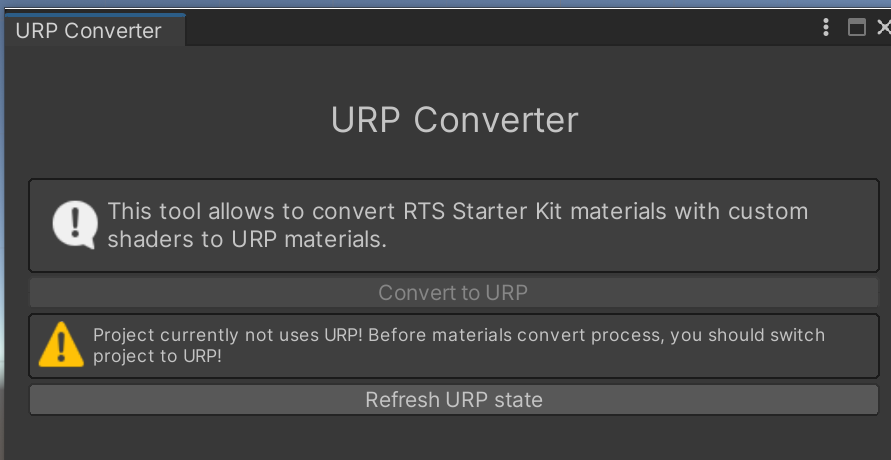
Tool also will try to convert materials using default Unity shaders, using official Unity API. But since it changes too frequently, this process can fail. In this case — read the partition below for version 1.8.0 — the process is the same.
Asset version 1.8.0
Most of the asset materials can be converted to URP automatically using Unity’s Render Pipeline Converter tool. More details on the Unity official Docs.
But units and buildings use a custom shader, which cannot be converted automatically. Starting from RTS Kit asset version 1.8.0, there is a UnitUrp shader in the asset directory. So, you can select all unit and building materials and change their shader to Shader Graphs/UnitUrp. Usually, all materials keep their settings after performing this action.
Note
Versions 1.8.1 and above feature full URP support for the asset materials: the auto-convert tool changes material shaders to the URP version.
Note
Fog of war shaders and materials should work fine in any render pipeline.
Asset version below 1.8
Warning
Old asset versions officially don’t support URP!
You can still try to use Unity’s Render Pipeline Converter tool. For all unit materials, use your own shader, or copy the UnitUrp shader from the new asset version (1.8.0+).