RTS Starter Kit

Tutorials

  • Information
  • Settings and Customization
    • Automatic Unit or Building setup
    • Damage and Armor
    • Fog of War
    • Game Settings Validator
    • Creating a new Faction (race)
    • Creating or customizing a Production Category
    • Customizing existing units
    • Creating a new Map
    • Creating a new Unit
    • Customizing game UI
    • Creating an infantry Unit
    • Creating a new Building
    • Creating a new Resource
    • House color feature usage
    • Creating a new Unit with a turret
    • Setting up Wheels for vehicle Unit
    • Creating and modifying Unit abilities
    • Map Validator
    • Melee-ranged attack type
    • Nav Mesh setup
    • Scenarios
    • Setting up single player (campaign) map
    • Creating a new rocket or bullet (shells)
    • Sound Settings and Sounds tab in Global Editor
    • Win Conditions
  • Programming

API Reference

  • Boot
  • Gameplay Service
  • Storing
  • Units
  • Controls
  • Match Settings
  • Player
  • Shell
  • Shell Service
  • Abilities
  • Spawn Service
  • Players Service
  • Order
  • Fog of War
  • AI
  • UI
  • Scenarios
RTS Starter Kit
  • Settings and Customization
  • Nav Mesh setup
  • View page source

Nav Mesh setup

There is nothing special about NavMesh setup in this asset — you can set it up the same way you would for a regular Unity project.

We only suggest some settings which work well in our case — an RTS game.

In the current version, the asset uses these NavMesh settings:
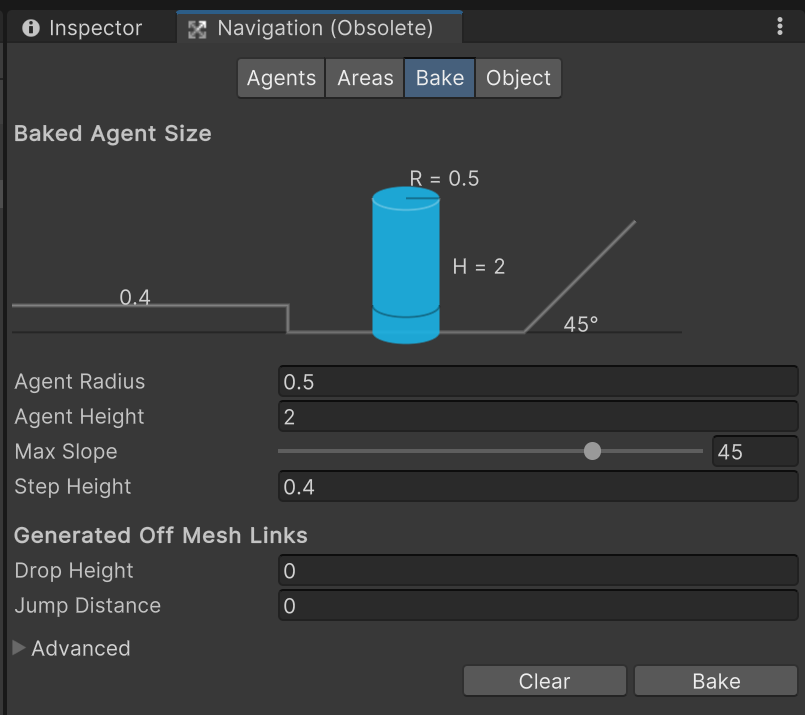
../../_images/nav-mesh-settings.png

It’s good, because it prevents units from moving at very steep terrain angles. But it only works fine for the example units’ scale. If the scale of your units is bigger or smaller, you need to find your own best NavMesh settings. But you can always look at our settings and make something similar, proportional to your scale.

Previous Next

© Copyright 2026, Insane Systems.

Built with Sphinx using a theme provided by Read the Docs.